
Why is my LoadBalancer still <pending>?
How Cilium's LB IPAM and L2 Announcements turn a pending LoadBalancer Service into a reachable VIP on your LAN.


⚠️ Before we dive in — highly worth your attention

James Presbitero writes about startups, leadership, and the realities of building companies from the inside. His posts combine founder experience with practical reflections on decision-making, growth, and navigating uncertainty - the kind of thinking that’s useful if you’re actually building something.
You deploy the standard Kubernetes pattern: an app Deployment, plus a Service of type: LoadBalancer. You run kubectl get svc and expect an external IP you can curl from your laptop. Instead:
$ kubectl get svc -n demo
NAME          TYPE           CLUSTER-IP       EXTERNAL-IP   PORT(S)        AGE
demo-web      LoadBalancer   10.96.120.200    <pending>     80:31234/TCP   20s
On cloud-managed clusters, this works because a cloud controller provisions a managed load balancer and writes the resulting IP into the Service's .status.loadBalancer field. Kubernetes delegates this provisioning to an external implementation - it doesn't provide one itself.
On bare metal, that cloud integration doesn't exist. Nothing chooses an IP from your LAN, and nothing announces that IP on your local network so traffic can find it. That's why the Service stays pending: no component has taken responsibility for the Service's external presence.
This article builds that missing responsibility using Cilium's documented bare-metal path: LB IPAM1 allocates an IP for your LoadBalancer Service, and L2 Announcements2 makes that IP reachable on your local network by responding to ARP and NDP queries. These are distinct problems with distinct mechanisms - understanding the separation is the whole game.
What Cilium is (and what it isn't)
Kubernetes networking has two separate layers that are easy to conflate.
Pod networking: when a pod starts, something must create its network interface, assign an IP, and wire up routes. Kubernetes delegates this to the Container Network Interface (CNI)3 model - a runtime calls a CNI plugin to configure container networking. The CNI boundary is "getting pods on the network", nothing more.
Service exposure: kube-proxy (or a replacement) takes a virtual ClusterIP/port and forwards traffic to backend pods. LoadBalancer Services extend this with an external IP - but Kubernetes explicitly leaves the external load balancer implementation to outside components. On bare metal, that means the cluster can be internally healthy while having no way to make a Service real on your LAN.
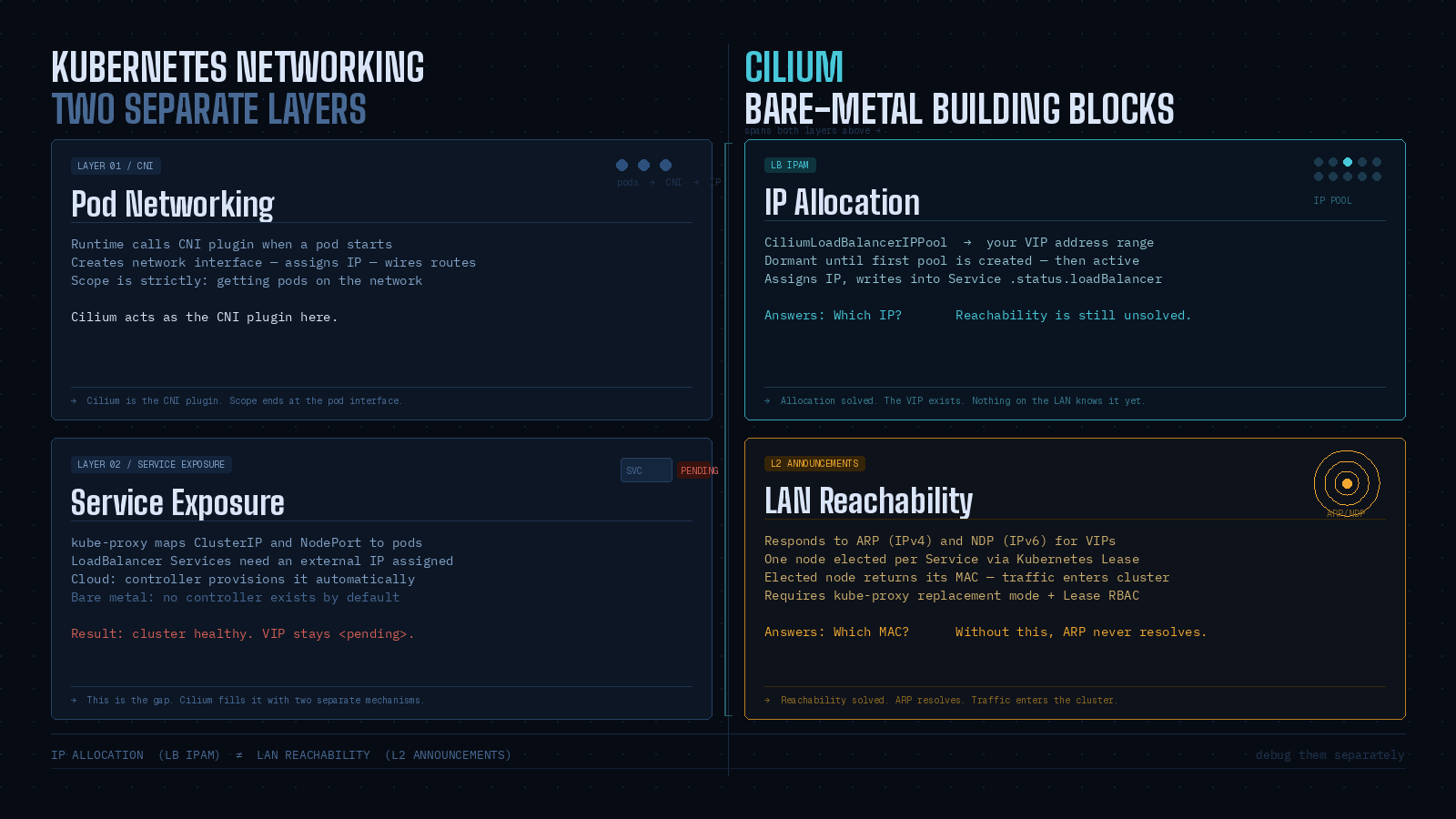
Cilium spans both layers. As a CNI plugin it handles pod networking. It also implements service load balancing in-kernel using its own datapath, and can run in kube-proxy replacement mode - a prerequisite for L2 Announcements. For bare metal specifically, Cilium provides two building blocks:
LB IPAM: allocates IPs from a configured pool and assigns them to
LoadBalancerServices. It is always enabled but dormant until you create at least one pool.L2 Announcements: responds to ARP (IPv4) and NDP (IPv6) queries for Service VIPs, making them reachable on the local network. Only one node responds for a given Service IP at a time, then load-balances to pods.
IP allocation (LB IPAM) and IP reachability on the LAN (L2 Announcements) are separate steps. Debug them separately.
Installing and Validating Cilium
Installing the Cilium CLI
The Cilium CLI4 is your workstation-side tool: you run it from a machine with kubeconfig access. Its job is installing Cilium, inspecting a Cilium installation, and enabling or disabling features like ClusterMesh or Hubble. It is not "Cilium running" - it's a client. The actual datapath work happens inside the cluster via the agent DaemonSet and operator Deployment.
The documented install method downloads the latest stable CLI from the CLI repository's stable.txt:
CILIUM_CLI_VERSION=$(curl -s https://raw.githubusercontent.com/cilium/cilium-cli/main/stable.txt)
CLI_ARCH=amd64
if [ "$(uname -m)" = "aarch64" ]; then CLI_ARCH=arm64; fi

curl -L --fail --remote-name-all \
  https://github.com/cilium/cilium-cli/releases/download/${CILIUM_CLI_VERSION}/cilium-linux-${CLI_ARCH}.tar.gz{,.sha256sum}

sha256sum --check cilium-linux-${CLI_ARCH}.tar.gz.sha256sum
sudo tar xzvfC cilium-linux-${CLI_ARCH}.tar.gz /usr/local/bin
rm cilium-linux-${CLI_ARCH}.tar.gz{,.sha256sum}
Verify it's present and connects to your environment:
which cilium
cilium version
This distinction between CLI and cluster components matters later: when you edit the cilium-config ConfigMap, you'll need to restart pods to pick up the change. The CLI doesn't do that automatically.
Installing Cilium into the cluster
From a "bring your own CNI" bare-metal cluster, the CLI-driven install is the shortest supported path:
cilium installThe installer attempts to pick appropriate defaults for your distribution and stores state as CRDs. If you need strict reproducibility, pin a version with --version 1.19.1. For this walkthrough we rely on validation rather than pinned versions.
After installation, wait for readiness:
cilium status --wait
   /¯¯\
/¯¯\__/¯¯\    Cilium:         OK
\__/¯¯\__/    Operator:       OK
/¯¯\__/¯¯\    Hubble:         disabled
\__/¯¯\__/    ClusterMesh:    disabled
   \__/

DaemonSet         cilium             Desired: 2, Ready: 2/2, Available: 2/2
Deployment        cilium-operator    Desired: 2, Ready: 2/2, Available: 2/2
Containers:       cilium-operator    Running: 2
                  cilium             Running: 2
Image versions    cilium             quay.io/cilium/cilium:v1.9.5: 2
                  cilium-operator    quay.io/cilium/operator-generic:v1.9.5: 2
This reports both the DaemonSet (agent) and Deployment (operator) reaching desired/ready counts. You can confirm with Kubernetes primitives in parallel:
kubectl -n kube-system get pods -l k8s-app=cilium
kubectl -n kube-system get deploy cilium-operator
One prerequisite to carry forward: L2 Announcements requires kube-proxy replacement mode5 to be enabled. At this stage you don't need to configure anything - just keep it in mind before expecting LoadBalancer VIPs to work externally.
Reproducing the pending LoadBalancer and fixing IP allocation
Creating a LoadBalancer service (it will be Pending)
To understand what we're fixing, create the failure deliberately. Deploy a minimal HTTP server and expose it as a LoadBalancer6 Service:
kubectl create namespace demo
kubectl -n demo create deployment demo-web --image=nginx --port=80
kubectl -n demo expose deployment demo-web --type=LoadBalancer --port=80
Check the Service:
kubectl -n demo get svcOn a bare-metal cluster with no external load balancer integration, EXTERNAL-IP shows <pending>. Kubernetes treats type: LoadBalancer as an abstraction that requires an external implementation to allocate an external IP and write it into .status.loadBalancer.
Cilium's LB IPAM documentation is explicit about what <pending> means: no LB IPs have been assigned. It expresses this state through Service status conditions - for example io.cilium/lb-ipam-request-satisfied with reason no_pool when no matching pool exists.
The important checkpoint here: nothing is wrong with your Deployment. Pods may be healthy, ClusterIP traffic may work, NodePort may work. What's absent:
No IP allocation policy for LoadBalancer Services (no pool exists or matches)
No L2 reachability mechanism (L2 Announcements is not enabled; nothing answers ARP for the VIP)
Fix these in order: allocate an IP first, then make it reachable.
Which tools are you using?
Have you tried Nginx, Envoy, or maybe you’re wrestling with AWS’s ELB quirks? I’d love to hear your thoughts, questions, or stories from the trenches.
Configuring LoadBalancer IP pool (LB-IPAM)
LB IPAM answers: "Which IP addresses are allowed to be assigned to LoadBalancer Services in this cluster?" It is designed for environments where cloud facilities are absent, and is always enabled but dormant until the first pool exists.
The CRD for pools is CiliumLoadBalancerIPPool (apiVersion: cilium.io/v2). The spec.blocks field defines allocatable IP space, either as CIDRs or as explicit start/stop ranges.
A practical bare-metal pattern: carve out a dedicated sub-range in your LAN that your DHCP server doesn't touch, reachable within the same L2 domain as your nodes. The numbers depend on your LAN; below is an example using a small "VIP slice" inside 192.168.111.0/24:
apiVersion: "cilium.io/v2"
kind: CiliumLoadBalancerIPPool
metadata:
  name: lan-vips
spec:
  blocks:
    - start: "192.168.111.200"
      stop:  "192.168.111.250"
Apply it and verify capacity:
kubectl apply -f lan-vips.yaml
kubectl get ippools
kubectl describe ippools/lan-vips
kubectl get ippools shows DISABLED, CONFLICTING, and IPS AVAILABLE. If you accidentally create overlapping pools, LB IPAM marks the later pool as conflicting and stops allocating from it.
Once a matching pool exists, LB IPAM assigns an IP to the pending Service. Check:
kubectl -n demo get svc
kubectl -n demo get svc/demo-web -o jsonpath='{.status.conditions}'
echo
At this point allocation is solved. Reachability is not. Your network has no reason to send traffic for that VIP to any node - nothing is answering ARP for it yet.
Trade-off worth naming here: L2 Announcements is the simpler bare-metal path - no BGP router required, no additional configuration on your upstream network. The cost is scope: it only works within a single L2 domain. If your nodes span multiple VLANs or subnets, L2 Announcements won't bridge them. In that case, Cilium's BGP control plane7 is the right approach instead. Everything that follows assumes a flat L2 network.
Enabling L2 Announcements for bare metal
Enabling L2 Announcements (ConfigMap method)
L2 Announcements makes Service VIPs reachable on the local network by responding to ARP (IPv4) or NDP (IPv6) queries. Because these VIPs aren't literally configured as addresses on any NIC, one elected node replies with its MAC and acts as the north/south entry point for that Service.
Two prerequisites:
kube-proxy replacement must be enabled
Network interfaces you intend to announce on must be part of the devices Cilium uses for service handling (relevant if you've set device filtering explicitly)
Enable L2 Announcements in the cilium-config ConfigMap:
kubectl edit configmap -n kube-system cilium-configAdd (or confirm) under data::
enable-l2-announcements: "true"Changing configuration via ConfigMap requires a pod restart to take effect. Complete the RBAC step below first, then restart both together.
RBAC: L2 Announcements uses Kubernetes leader election based on Lease8 objects (coordination.k8s.io API group). Without the right permissions, the agent cannot create or update the Lease objects it needs, and the feature fails even with the ConfigMap key set. Cilium's own troubleshooting documentation calls this out directly: if you see "forbidden" errors against leases.coordination.k8s.io, you must update the cilium ClusterRole.
Edit the ClusterRole:
kubectl edit clusterrole ciliumAdd this rule block under rules: if it's not already present:
- apiGroups:
  - coordination.k8s.io
  resources:
  - leases
  verbs:
  - create
  - get
  - update
  - list
  - delete
This RBAC change is not optional for manual enablement. Lease-based leader election is fundamental to how L2 Announcements works - each selected Service maps to a Lease, and the Lease holder is the sole responder to ARP/NDP for that Service's VIP.
Restarting Cilium and verifying L2 is active
Restart the DaemonSet to pick up both changes:
kubectl -n kube-system rollout restart ds/cilium
kubectl -n kube-system rollout status ds/cilium
Verify in three layers.
Internal configuration - confirm the feature flags are active inside a running agent pod:
kubectl -n kube-system exec ds/cilium -- cilium-dbg config --all | grep EnableL2Announcements
kubectl -n kube-system exec ds/cilium -- cilium-dbg config --all | grep KubeProxyReplacement
Overall health:
cilium status --wait
    /¯¯\
 /¯¯\__/¯¯\    Cilium:         OK
 \__/¯¯\__/    Operator:       OK
 /¯¯\__/¯¯\    Hubble:         OK
 \__/¯¯\__/    ClusterMesh:    disabled
    \__/

Deployment        cilium-operator    Desired: 2, Ready: 2/2, Available: 2/2
DaemonSet         cilium             Desired: 2, Ready: 2/2, Available: 2/2
Containers:       cilium-operator    Running: 2
                  cilium             Running: 2
Cluster Pods:     5/5 managed by Cilium
Service state - confirm IP allocation is still satisfied after the restart:
kubectl -n demo get svc demo-web
kubectl -n demo get svc demo-web -o jsonpath='{.status.conditions}'
echo
The agent now participates in Service-specific leader election and can respond to ARP/NDP for selected VIPs. But nothing is announced yet: L2 Announcements won't announce any VIP until you define at least one CiliumL2AnnouncementPolicy.
Creating a CiliumL2AnnouncementPolicy
A CiliumL2AnnouncementPolicy is the selection logic that turns "L2 Announcements is enabled" into "this particular Service VIP is announced on this particular interface by one eligible node".
Current stable API:
apiVersion: cilium.io/v2alpha1kind: CiliumL2AnnouncementPolicy
A minimal policy for bare metal:
apiVersion: "cilium.io/v2alpha1"
kind: CiliumL2AnnouncementPolicy
metadata:
  name: demo-l2
spec:
  serviceSelector:
    matchLabels:
      app: demo-web
  nodeSelector:
    matchExpressions:
      - key: node-role.kubernetes.io/control-plane
        operator: DoesNotExist
  interfaces:
    - ^eth[0-9]+
  loadBalancerIPs: true
A few things about this policy worth understanding:
serviceSelectoruses a standard label selector. Cilium also supports special keys likeio.kubernetes.service.namespaceandio.kubernetes.service.nameto match by namespace or name without adding labels to Services.nodeSelectorhere excludes control-plane nodes - a reasonable default for bare-metal clusters where you don't want ingress traffic landing on the control plane.interfacestakes Go regex patterns.^eth[0-9]+matcheseth0,eth1, and so on. Interface patterns only take effect on interfaces Cilium already considers for service handling - verify withcilium-dbg shell -- db/show devices.loadBalancerIPs: trueis required. BothexternalIPsandloadBalancerIPsdefault to false; at least one must be explicitly enabled or no VIPs are announced.
Apply the policy and label the Service so it matches:
kubectl -n demo label svc demo-web app=demo-web --overwrite
kubectl apply -f demo-l2-policy.yaml
One matching detail that often goes unnoticed: a Service must have loadBalancerClass unset or set to io.cilium/l2-announcer to be eligible for announcement. If loadBalancerClass is set to something else, the policy won't select it even if every other selector matches.
Once the policy exists and matches, Cilium creates a per-Service Lease and begins announcing the VIP from the current lease-holder node.
Using specific VIPs and understanding the traffic path
Assigning a specific IP to a Service
Once LB IPAM has a pool, you can either accept any free VIP or request a specific one. Use a specific IP when the address becomes part of an external contract - a DNS A record, a NAT rule on your router, an upstream allowlist - because those external references need to stay stable across Service restarts.
The Cilium-supported annotation for this is lbipam.cilium.io/ips:
kubectl -n demo annotate svc demo-web lbipam.cilium.io/ips="192.168.111.11" --overwriteOr in manifest form:
apiVersion: v1
kind: Service
metadata:
  name: demo-web
  namespace: demo
  annotations:
    "lbipam.cilium.io/ips": "192.168.111.11"
spec:
  type: LoadBalancer
  selector:
    app: demo-web
  ports:
    - port: 80
      targetPort: 80
The legacy .spec.loadBalancerIP field was deprecated in Kubernetes v1.24 and its behavior varies across implementations. Prefer the annotation.
LB IPAM validates two things: the requested IP must fall within an existing pool, and the pool's serviceSelector must match the Service. A request that doesn't satisfy both stays unallocated. Also avoid requesting the first or last IP in a pool - many IPv4 networks treat those as network and broadcast addresses, and Cilium's docs explicitly warn against them.
Know someone who’s just getting into backend development or cloud architecture
If this post helped you, pass it along - help them level up too. 👇
End-to-end traffic flow
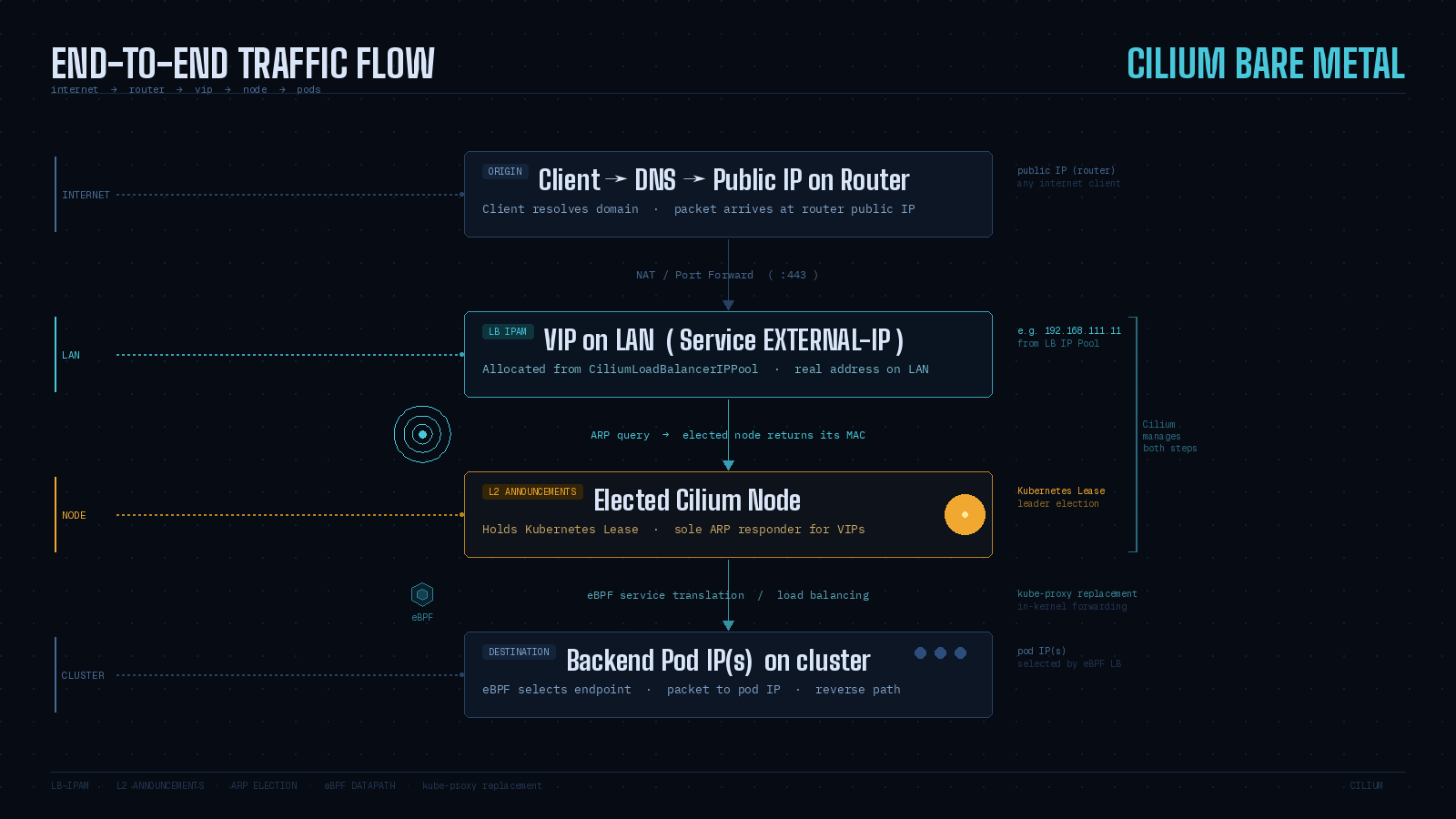
Once LB IPAM assigns a VIP and L2 Announcements is active, the path from the outside becomes deterministic. Using the common home-lab pattern of public DNS → router NAT → LAN VIP.
A few steps worth understanding explicitly.
The VIP is an ordinary LAN IP. Your router forwards to it the same way it would forward to any host on the LAN - not to a cloud load balancer appliance, not through any tunnel. The VIP address is real to the LAN; it's only "virtual" in the sense that no NIC has it configured as a static address.
ARP provides the binding. To forward a packet to the VIP, the router must resolve which MAC address owns it. Cilium L2 Announcements responds to those ARP queries (or NDP for IPv6) on behalf of the VIP, returning the MAC of the current leader node.
One node holds the Lease. ARP caches keep one MAC per IP - multiple responders would cause flapping. Cilium enforces single ownership through Kubernetes Lease-based leader election: one node holds the Lease per Service and is the sole ARP responder for that VIP.
Failover is real but not instant. If the leader stops renewing the Lease, other eligible nodes race to take over. The new leader sends gratuitous ARP to update neighbor caches. Some clients ignore gratuitous ARP for security reasons, which can extend the failover window beyond the nominal lease timers. This is worth understanding before putting L2 Announcements in front of latency-sensitive workloads.
Troubleshooting
Debugging layer by layer
When a LoadBalancer Service on bare metal fails, debug in the same order traffic must succeed: Service state → IP allocation → L2 selection → ARP visibility → Lease ownership.
Service status (Kubernetes view)
kubectl -n demo get svc demo-web
kubectl -n demo describe svc demo-web
kubectl -n demo get svc/demo-web -o jsonpath='{.status.conditions}'
echo
<pending> means no LB IPs have been assigned. The condition io.cilium/lb-ipam-request-satisfied with reason no_pool means no enabled pool matched the Service.
IP allocation (LB IPAM view)
kubectl get ippools
kubectl describe ippools/lan-vips
Check DISABLED and CONFLICTING. Overlapping pools cause a conflict and block allocation from the conflicting pool. Also confirm your Service labels match any pool serviceSelector you configured.
L2 policy match (Cilium L2 view)
kubectl get CiliumL2AnnouncementPolicy
kubectl describe CiliumL2AnnouncementPolicy demo-l2
Invalid policies surface errors as status conditions (for example io.cilium/bad-service-selector). Also check loadBalancerClass on the Service - L2 Announcements selects Services with loadBalancerClass unset or set to io.cilium/l2-announcer.
ARP visibility (network view)
From a host on the same LAN as your nodes:
arp -a | grep 192.168.111.11If ARP never resolves, the VIP isn't being announced. The problem is in Cilium configuration, not in pod health.
Lease objects (leader election view)
kubectl -n kube-system get lease | grep cilium-l2announceIf no Leases exist, either the policy doesn't match or the agent can't create them. If agent logs mention "forbidden" access to leases.coordination.k8s.io, the RBAC step was missed.
For deeper inspection from inside an agent pod:
kubectl -n kube-system exec ds/cilium -- cilium-dbg shell -- db/show l2-announce
kubectl -n kube-system exec ds/cilium -- cilium-dbg shell -- db/show devices
These show which IPs are announced on which interfaces, and whether the interface is in Cilium's device list.
💡 Want more like this delivered to your inbox?
Closing thoughts
Two problems, two mechanisms.
LB IPAM answers "which IP?" - it gives your LoadBalancer Service an address from a pool you define. Without it, the Service stays <pending> indefinitely.
L2 Announcements answers "which MAC?" - it makes that IP visible on your LAN by responding to ARP and NDP on behalf of the VIP. Without it, the IP exists in Kubernetes but is unreachable from the network.
Things to keep close:
LB IPAM is always running but dormant - it activates the moment you create the first pool.
L2 Announcements requires kube-proxy replacement mode and Lease RBAC. Both must be in place before the feature does anything.
L2 scope is one L2 domain. If your nodes span VLANs or subnets, use Cilium's BGP control plane instead.
One node holds the Lease per Service. Failover exists but isn't instant - gratuitous ARP helps, but some clients ignore it.
Debug in order: Service conditions → pool status → policy match → ARP table → Lease objects.
Request specific IPs with the
lbipam.cilium.io/ipsannotation, not the deprecated.spec.loadBalancerIPfield.Interface patterns in
CiliumL2AnnouncementPolicyare Go regex and must match interfaces in Cilium's device list - confirm withdb/show devices.