
How Load Balancing really works — and why it is not just about splitting traffic
System design fundamentals

⚠️ Before we dive in — highly worth your attention

This week I want to highlight Product with Attitude by Karo (Product with Attitude) - a newsletter rooted in practical AI product thinking. Karo writes about how to design, build, and test with clear purpose, not just hype. If you want less noise and more frameworks that actually improve how you build with AI, this is one of the feeds I trust most.
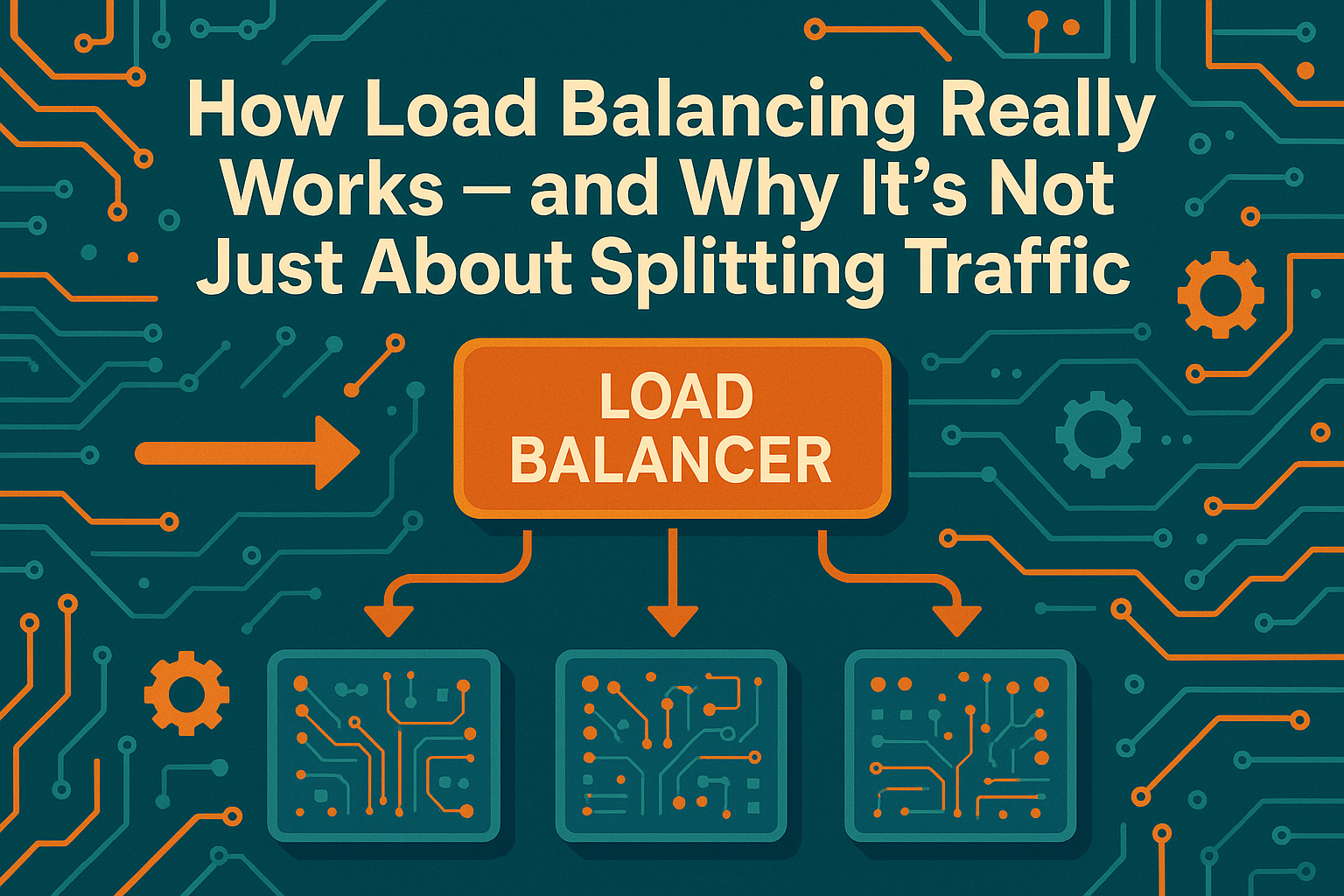
Imagine you run a restaurant with three chefs.
Customers keep coming in, and the waiter (your load balancer) has to assign orders.
In a perfect world, each chef gets an equal share.
But in reality? One chef is faster, another is stuck with a complicated dish, and the third just went out for coffee.
The waiter has to make quick, smart choices to keep everyone happy.
In a computer system, a load balancer plays the role of that attentive waiter. It’s not just blindly splitting work evenly - it’s making intelligent decisions about where each “order” (network request) should go. The goal is to keep the service running smoothly, just like our waiter keeps the restaurant flowing. This light metaphor hints at a key idea: load balancing is about intelligent flow management, not just fairness. Before diving into tech details, keep that intuitive image in mind - smart coordination to prevent overload and ensure everyone (and every server) stays productive.
🧩 What Load Balancing actually is
Let’s start simple. Load balancing means distributing incoming work across multiple servers or instances.1 Instead of one server handling all requests (and risking overload), a group of servers share the job. The goal isn’t just to “spread the load” evenly for fairness - it’s to ensure a few critical benefits.
Performance. No single server gets overwhelmed and slow. By sharing requests, the system can respond faster. In fact, a load balancer ensures no one server bears too many requests, which directly improves application speed and responsiveness.2
Reliability (High availability). If one server fails or needs maintenance, others can take over. With a good load balancer, one node can fail without taking down the whole system. The site stays up because traffic is redirected to healthy servers (this failover mechanism is often automatic).
Scalability. You can add more servers as demand grows, and the load balancer will include them in the rotation. This horizontal scaling means you can serve more users just by adding new instances, with minimal disruption.
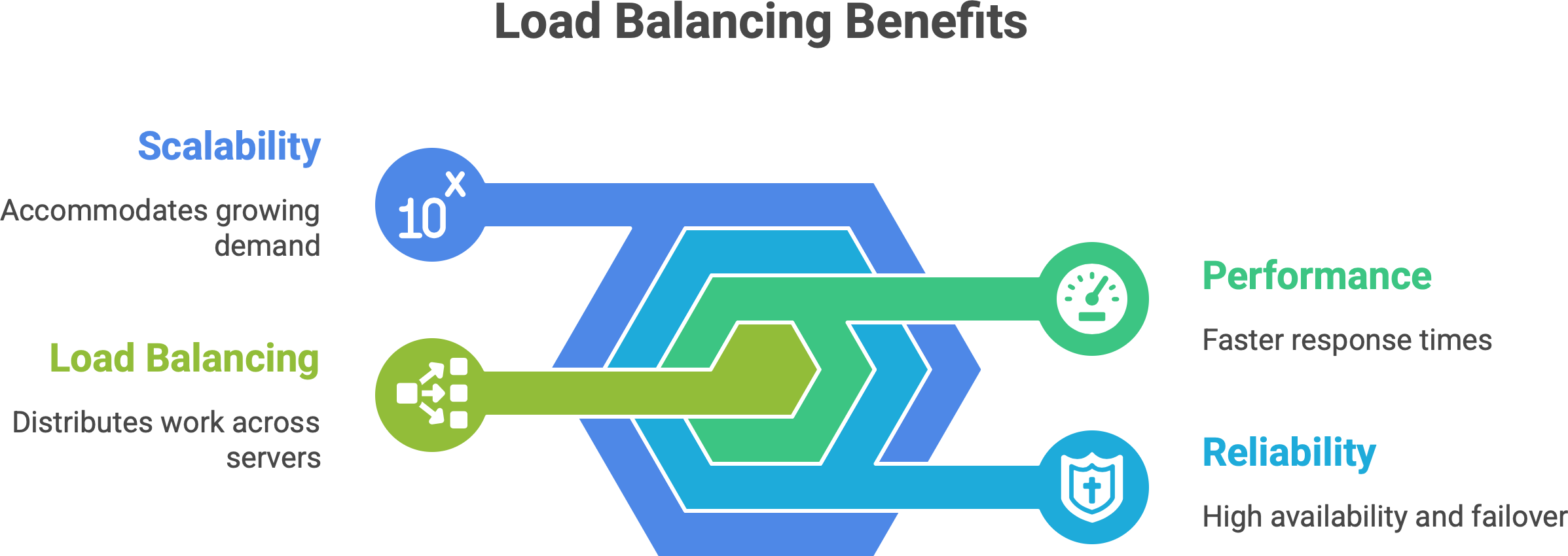
In short, load balancing is the technique that makes a cluster of machines behave like one reliable, fast service. It’s like an orchestra conductor - they don’t play an instrument themselves, but by directing each musician at the right time, they ensure the performance (your application) is harmonious and can handle a big audience. The conductor (load balancer) doesn’t strum a violin, yet without them coordinating, the music would fall apart.
Key point: Load balancing isn’t a luxury; it’s a cornerstone of modern system design. Without it, a busy service can suffer single points of failure, slowdowns, or total crashes if one server can’t handle a spike in traffic. With it, we get a system that’s steady under pressure - as our restaurant story showed, it’s about managing the flow intelligently so no single chef (or server) is in the weeds.
🧠 Where Load Balancing happens — layers and levels
Load balancing doesn’t only happen in one place or one way. It can occur at different layers of the network/application stack, each with a different scope and method.
Enjoying the metaphors so far? I write posts just like this - breaking down tech concepts with plain language and real-world comparisons.
💡 Want more like this delivered to your inbox?
Layer 4 (Transport layer) Load Balancing. This operates at the TCP/UDP level. A Layer 4 load balancer routes traffic based on low-level info like IP address and port, without understanding the content of the request.3 It’s essentially doing packet forwarding. Think of it as fast and dumb – it just knows “this packet goes to Server 1, next to Server 2”, etc., and doesn’t peek inside the HTTP request. Because it’s simple, it’s very high-performance (blazingly fast). Classic network appliances and some cloud load balancers (like AWS Classic ELB or Network LB) work at L4, as do tools like HAProxy in TCP mode. An L4 balancer can’t, for example, route traffic based on an HTTP URL – it just sees addresses and ports.4 But it’s great for raw speed and is often used for lower-level balancing of non-HTTP protocols or as a first-line balancer for lots of connections.
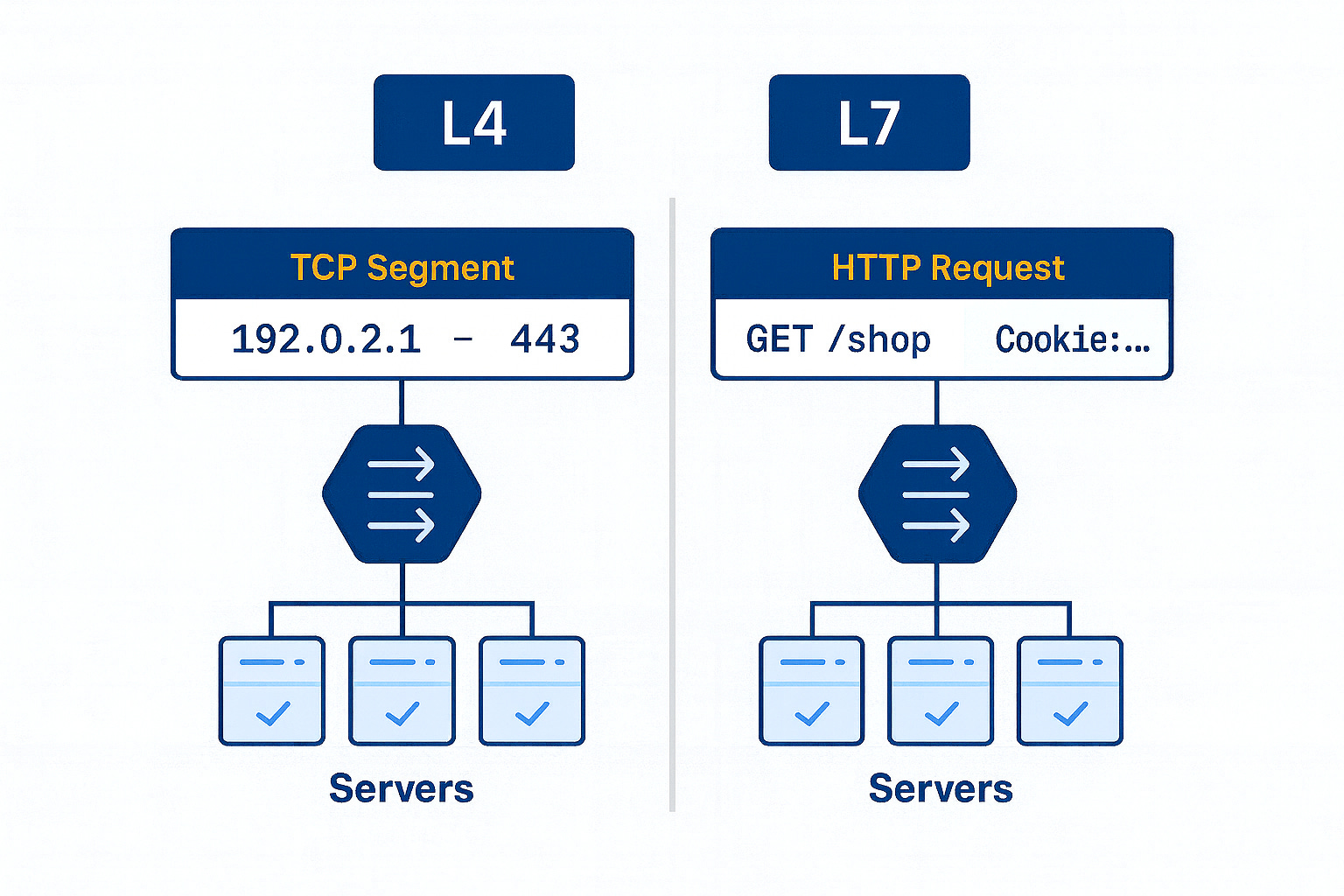
Layer 7 (Application layer) Load Balancing. This works at the HTTP/HTTPS (or gRPC, etc.) layer. A Layer 7 load balancer actually looks at the content of the requests – URLs, headers, cookies, etc. – and can make smarter routing decisions. For example, it could send all image requests to a dedicated image server pool, or route /api/* paths to a different cluster than /web/*. Because it operates with full knowledge of HTTP, a Layer 7 balancer can do things like TLS termination (decrypting HTTPS), cookie-based “sticky sessions”, and content-based routing. Nginx, Traefik, Envoy, or cloud Application Load Balancers (ALB) fall in this category. The trade-off: L7 balancing adds some overhead – it’s doing more work (maintaining two TCP connections, parsing requests) which can add a bit of latency. But in modern systems, this overhead is usually small (milliseconds or less5 for each request) compared to the flexibility gained. In practice, most web applications use L7 load balancing because it allows intelligent control at the HTTP level.
In our restaurant analogy, this is like a head waiter who knows not just how many orders each chef has, but also what type of dish each order is – allowing them to assign by complexity, not just count.
DNS Load Balancing. This is a load balancing at the DNS level, often called round-robin DNS. It’s actually the simplest form of load distribution. Here, multiple IP addresses are registered for one domain name. Each DNS query for the name may get a different IP from the list, thereby spreading traffic across servers geographically or by simple rotation.6 For example, www.example.com might resolve to IP1 on one lookup and IP2 on the next. Big CDNs and global services use DNS load balancing to direct users to a server cluster nearest to them. Pros: It’s simple and doesn’t require an explicit proxy in the middle. Cons: It’s very coarse. DNS caching can cause uneven distribution (some clients will keep hitting the same IP). And if one server goes down, DNS might still hand out its IP unless additional measures (health-check aware DNS or short TTLs) are in place. So, round-robin DNS helps with simple global load spreading, but by itself it doesn’t account for server load or even guarantee a down server is avoided. Many services combine DNS load balancing with other layers (for instance, DNS directs you to a regional load balancer, which then does L7 balancing).
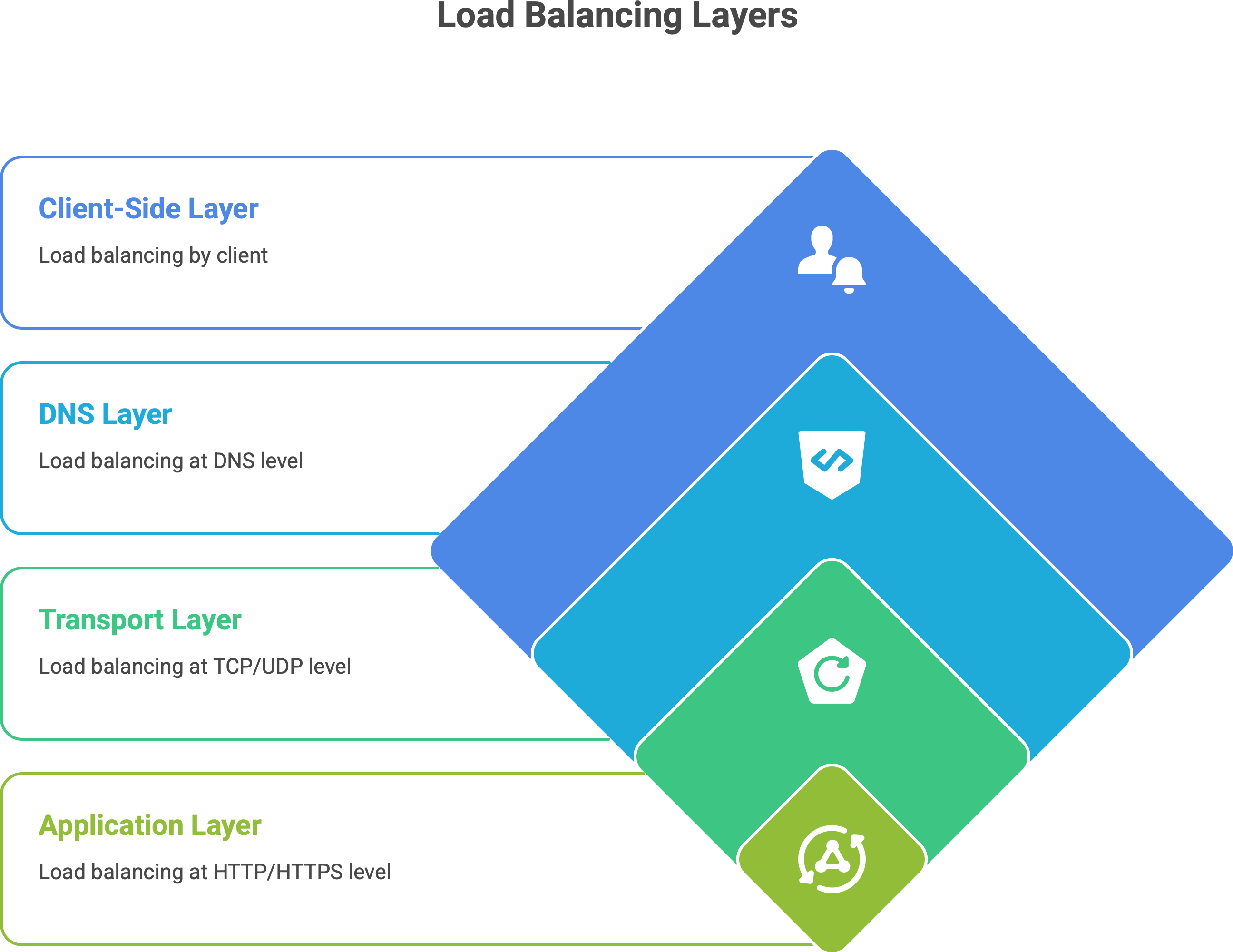
Client-Side Load Balancing. This flips the scenario: instead of a central load balancer dispatching requests, the client (or a client-side library) decides which server to talk to. In microservices architectures, it’s common to use service discovery where each service instance registers itself (with a service registry like Eureka, Consul, etc.). When Service A wants to call Service B, it asks the registry for all available endpoints of B. Then Service A itself picks one of B’s instances (often at random or round-robin) to send the request to.7 This is client-side load balancing. Advantages: It removes the extra network hop - a dedicated load balancer in between services isn’t needed, which can improve performance. Each service call goes direct to a chosen instance. Disadvantages: The logic to choose an instance now lives in the client or a library. That means complexity in each service (or language-specific libraries), and if the list of servers changes, clients need to update their info. Also, each client must implement health checking or retry logic on failures. Systems like Netflix OSS (Ribbon, Eureka) or gRPC’s built-in load balancing use this approach. Think of it like removing the waiter entirely and handing each customer a list of chefs to choose from; it can work well if customers are smart about picking an available chef. In practice, client-side LB is often used inside clusters (microservice-to-microservice calls), while external traffic from users is handled by centralized L7 or L4 load balancers.
To visualize a simple case of load balancing in action:
User → Load Balancer → Servers (S1, S2, S3)Here, the user hits one address (the load balancer), and the balancer then forwards the request to one of the servers S1, S2, or S3. That could be happening at L4 or L7 as described. In complex systems, you might even see multiple layers of load balancing: e.g., DNS directs you to a region, a layer-4 balancer spreads load among data centers, and a layer-7 balancer routes within a cluster. Each layer has its role in keeping traffic flowing efficiently.
⚙️ Common Load Balancing strategies
How does a load balancer actually decide where to send each request? There are many load balancing algorithms in use, each with different trade-offs. The choice can be static or dynamic. Let’s break down some real strategies and when they’re used.
➡️ Insight: Load balancing isn’t just about picking the next server in line. It’s about context-aware decision-making. A simple round-robin might assume every request is equal, but as we know, in reality one “order” might be a quick salad and another a complex entrée. Modern load balancers can be surprisingly sophisticated: some cloud load balancers use algorithms that consider things like the fewest outstanding requests (to account for slow vs fast requests)8, or combine multiple factors. The right strategy depends on your scenario – simple algorithms for simple needs, and adaptive ones when you need that extra “brainpower” in the balancer to keep things flowing smoothly.
🌊 Load Balancing and state
One tricky aspect in load balanced environments is user session state. Imagine a user logs into your website – their session data (e.g. login status, shopping cart) might be stored in memory on the server that handled the login. Now, what if their next request goes to a different server via the load balancer? That second server might not know about the user’s session, and suddenly the user appears logged out or their cart is empty. This can be a big problem if not addressed.
There are a few ways to handle state in a load-balanced system.
Sticky Sessions (Session affinity). This is like telling the load balancer, “once a user goes to a server, keep them on that server for all subsequent requests”. The load balancer will identify the user (often via a cookie or the client’s IP) and always route them to the same backend server – effectively binding the session to that server.9 It’s like the waiter remembering you and always taking you to the same table with the same chef because that chef knows your ongoing order. Many load balancers support this: they might set a special cookie on the first response that tags the server, and read it on future requests to enforce the stickiness. Pro: It solves the immediate consistency problem – that user’s session data stays warm on one server. Cons: It can lead to uneven load (some servers get lots of “sticky” users, others get few) and reduces fault tolerance (if that one server crashes, those users’ sessions are lost).10 Essentially, sticky sessions trade off some of the benefits of load balancing for the sake of state. It’s often considered a quick fix or a smaller-scale solution. For example, in a pinch, you might enable sticky sessions on an AWS ELB so that users don’t bounce between instances during a short session.
External Session stores. A more scalable approach is to decouple the session data from any single web server. Instead of storing session info in each server’s memory, store it in a shared place that all servers can access. This could be a database, a distributed cache like Redis or Memcached, or another dedicated session service. Then any server can handle any request because they all consult the central session store. For instance, in a PHP app, you might configure sessions to go to a Redis cluster. Or in Java, use a shared database or in-memory data grid. This way, it doesn’t matter which server the load balancer picks – the user session is the same. Pro: You regain full load balancing freedom; truly any request can go anywhere, and losing one server doesn’t drop sessions (they’re in the central store). Con: The central session store can become a new bottleneck or point of failure if not managed (though these systems are usually made robust). Also, there’s a performance cost to reading/writing session data over the network. But in practice, many large systems use this approach because it keeps the web tier stateless. In our restaurant analogy, this is like writing down the order and customer preferences in a central book that any chef can read – so even if the customer moves to a different table, the new chef can pick up where the last left off.
Client-Side Sessions (Tokens). Another modern solution is to avoid server-held session state altogether by using something like JWTs (JSON Web Tokens) or other signed tokens. In this model, when a user logs in, the server gives the client a token (often encoded with user info and an expiration, and cryptographically signed). On subsequent requests, the client (browser/app) sends this token, and any server can validate it and know who the user is (and maybe some basic info) without needing to look up anything in memory or database. This is essentially a stateless session – the state is carried by the client. It’s popular in microservice and API designs. Pros: Truly stateless on the server side – any server can serve any request, no dependency on shared caches or sticky routing. Cons: You can’t easily invalidate a JWT (except by expiration) unless you keep a blacklist, and if you store too much in it, the token can get large. Also, for very sensitive data, you might still prefer a server-side store. Nonetheless, this approach complements load balancing by eliminating the whole issue of “which server has the session”.
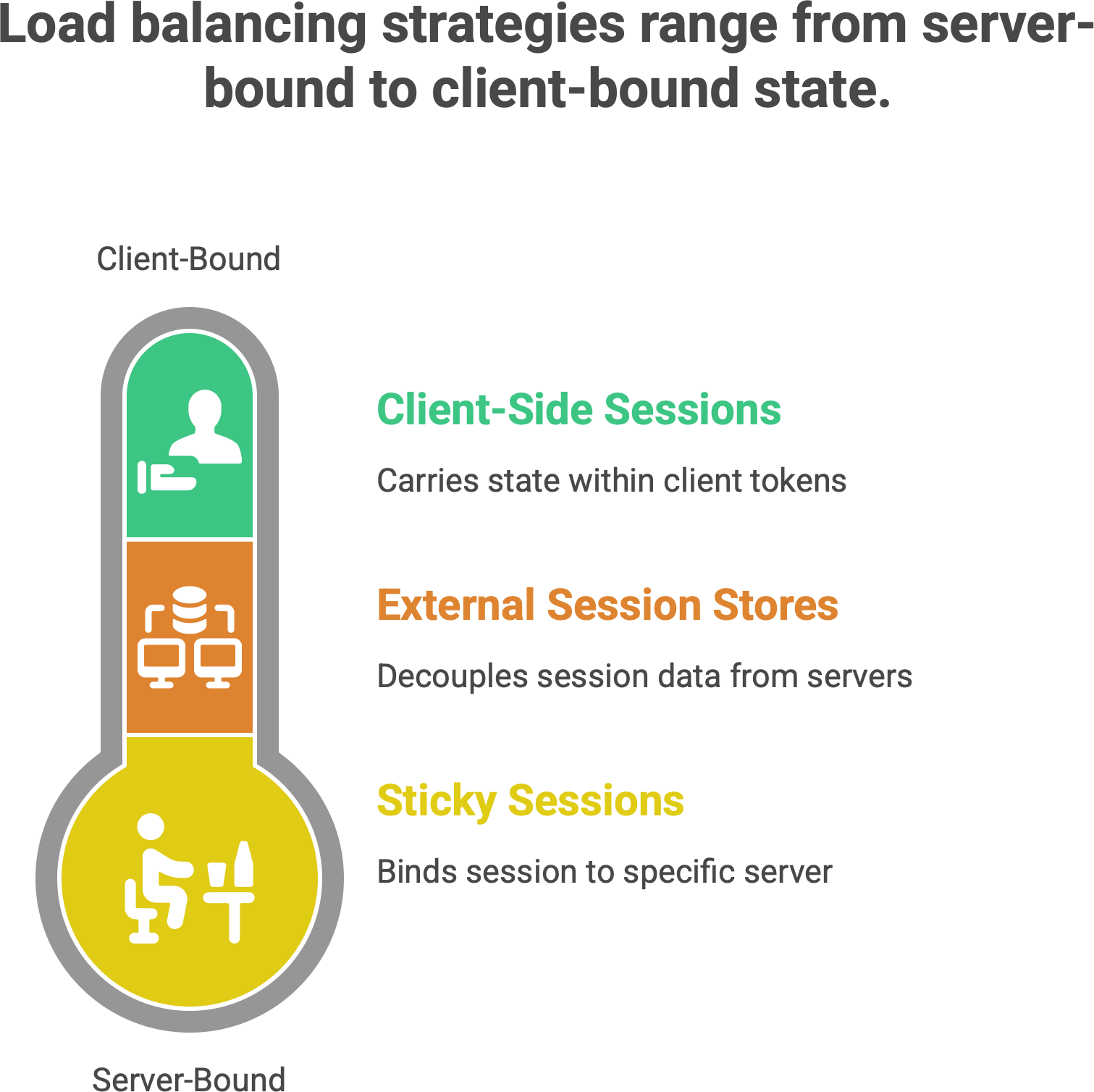
Now back to sticky sessions, since that’s a direct load-balancing feature: It’s worth noting sticky sessions are often considered a necessary evil or a quick workaround. If used, one should be aware that it breaks pure load distribution. For example, if 100 users all happen to get “stuck” to Server A because they all hit it around the same time, Server A will carry all their load, while Server B sits idle – thus defeating the purpose of balancing. Additionally, if that server A goes down, those 100 users’ sessions vanish (they were never saved elsewhere). Real-world story: an e-commerce site once had a sticky-session setup; when one server “zombied” (stopped actually working but didn’t fully crash), the load balancer’s health check was naive and kept sending that user’s traffic to it. Those users got a bad experience (lost carts, errors) because the LB insisted they go to the same dead server.11 The lesson: if you do sticky, make sure to externalize critical state or have a backup plan.
Alternatives Recap: The more robust solution is to design apps to be stateless or use shared state. For instance, one can store user session data in a fast key-value store (like Redis) so that any server can retrieve it. That way, the load balancer is free to truly balance every request independently. Many frameworks have easy hooks for this (e.g., Django can use cache-based sessions, PHP can use memcached for session storage12, etc.). The use of JWTs or tokens has also become very common in RESTful API scenarios – it sidesteps the whole sticky session issue elegantly.
To use the analogy given: sticky sessions are like the waiter remembering you specifically and always seating you at the same table (helpful if your food was left there). A central session store is like the whole restaurant having a shared knowledge base (“Kitchen Display System”) of what each regular customer is doing – so any waiter or chef can serve you seamlessly. The latter is more scalable in a busy restaurant chain!
For beginners: the main takeaway is that load balancers by default don’t remember anything about users – which is good for stateless scaling, but you must architect your app accordingly. If you have user-specific state that can’t be lost, plan for it. Either enable session affinity on the LB (with the caveats noted) or better, keep the app stateless across servers by not tying user data to one server’s memory.
🚦 Load Balancing in the real world — from Nginx to Envoy
Thus far, we’ve talked conceptually. Let’s connect this to real tools and technologies you might encounter.
Traditional Software Load Balancers (L4/L7): Examples include Nginx, HAProxy, and Apache Traffic Server, among others. These are software applications you deploy on servers (or use as a service) that implement load balancing. Nginx and HAProxy are extremely popular open-source solutions. Nginx often acts as a reverse proxy and load balancer (mostly L7, but can do L4) – in fact, as of a few years ago, Nginx was estimated to handle around 25% of the traffic of the top million websites13, showing how widely it’s used in the wild. HAProxy is another battle-tested load balancer (the name stands for High Availability Proxy). These solutions can be deployed on commodity hardware, which historically was a big shift from the older model of hardware load balancers. A decade or two ago, companies commonly used hardware appliances (like F5 Big-IP or Citrix NetScaler) – specialized devices in data centers – to do load balancing. Now, software like Nginx/HAProxy on standard servers (or containers) does the job, which is more flexible and cost-effective.14 You can even run multiple instances for redundancy. For example, you might have two HAProxy servers in active-passive mode – if one goes down, the other takes over, to avoid the LB itself being a single point of failure.
Modern Reverse Proxies and Edge Balancers: Envoy is a newer proxy developed at Lyft, now widely used, especially in cloud-native environments. Envoy supports advanced L7 features and is designed for microservices architecture. It’s often used in what’s called a service mesh (more on that in a second). Traefik is another modern L7 balancer that integrates well with container environments (like Docker/Kubernetes), auto-discovering services. These modern proxies not only do load balancing but also things like circuit breaking, retries, and detailed metrics. They blur the line between “just a load balancer” and an “application traffic management layer”. For example, NGINX Plus (the paid version of Nginx) and Envoy both can do adaptive health checks, content-based routing, and even act as API gateways.
Service Mesh (Envoy/Istio): In cloud-native microservices, a pattern emerged: instead of each service doing client-side load balancing or having one big gateway, you can run a small “sidecar” proxy next to each service instance. Istio is a popular service mesh, and it uses Envoy proxies as sidecars. In an Istio service mesh, all traffic from Service A to Service B goes through Envoy, which can load balance among B’s instances, handle retries, and enforce policies. Essentially, Envoy in this context is doing client-side load balancing on behalf of the service, but it’s centrally configured. Envoy supports many algorithms (round robin, least request, etc., even “ring hash” for consistent hashing).15 It also brings features like mutual TLS, traffic shadowing, etc., showing how load balancing is now part of a larger traffic control fabric. The key takeaway: tools like Envoy and Istio move load balancing into software that is deeply integrated with your application environment (Kubernetes, for example). They treat load balancing not as a separate appliance but as a built-in capability of your platform. This gives a lot of power: Istio/Envoy can, say, detect if one instance is slow and steer traffic away, or do A/B testing by routing 5% of users to a new service version. It’s beyond simple load splitting - it’s intentional routing as part of architecture.
Cloud Provider Load Balancers: All major cloud providers offer managed load balancing services. For example, AWS has the Elastic Load Balancer (ELB) family: Classic LB, Application LB (ALB), Network LB (NLB), and newer Gateway LB. Google Cloud has Cloud Load Balancing (with global anycast capability), Azure has Azure Load Balancer and Application Gateway, etc. These services are essentially “load balancers as a service”. You don’t manage the software or VMs directly; the cloud handles it and usually provides high availability by default. One strong advantage is integration: e.g., an AWS ALB can integrate with auto-scaling groups and target groups so that new EC2 instances register themselves automatically. Some cloud load balancers can do things that are hard to replicate on-prem, like Google’s Cloud Load Balancing uses a single anycast IP that fronts servers in multiple regions around the world16 - meaning a user is automatically routed to the nearest healthy instance globally, with seamless failover if an entire region goes down. Cloud LBs also often come with built-in health checks and monitoring. They might cost money per hour and per GB of data, but they save ops work.
Hardware Load Balancers (Legacy and Niche): It’s worth noting that hardware load balancers are still around in some enterprises (for very high throughput needs or legacy reasons). These are physical devices with custom chips (ASICs) that can do extremely fast L4 routing, and often L7 too. They often come with features like SSL offloading at huge scale. Companies like F5 Networks dominated this space. However, the trend has been moving away from these because of cost and flexibility. Commodity servers and cloud LBs have eaten a lot of that lunch. Still, if you ever hear “ADC” (Application Delivery Controller), that often refers to these advanced hardware (or virtual appliance) load balancers that do a ton (load balancing, compression, security, etc.). In our analogy, this is like having a super-expensive robot waiter; it can serve really fast but might be hard to change its behavior without buying a new one.
Global Traffic Managers: These are a layer above - often using DNS - to distribute traffic across geographies. For instance, if you have one deployment in US and one in Europe, a global load balancer can send European users to the EU servers and US users to US servers (reducing latency). Cloudflare, AWS Route 53 with latency-based routing, or Azure Traffic Manager serve this role. It’s load balancing at the internet level.
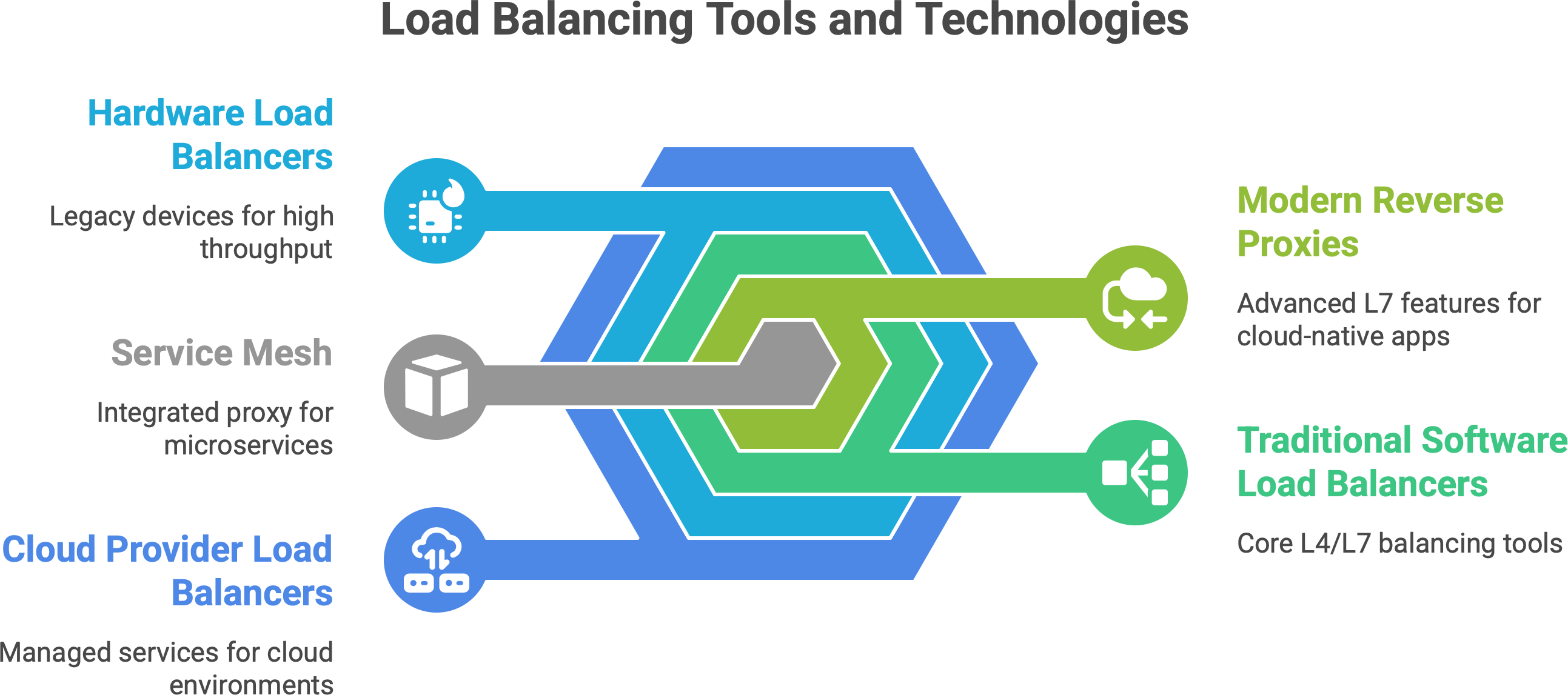
A quick reflection on evolution: Load balancers used to be boxes in a rack, specialized and static. Now, they’re everywhere in software. In Kubernetes, every Service is like a little load balancer for pods. In front-end applications, CDNs act as load balancers for edge servers. We even have load balancing algorithms in libraries. The concept has permeated every layer because modern apps demand flexibility and resilience. Load balancing is no longer just an appliance or a single point in architecture - it’s a distributed, software-defined function that can happen at multiple points in the data flow.
To put it another way, the load balancer has become part of our “service fabric”. It’s not just forwarding packets; it’s often making decisions based on application behavior (URL patterns, user identity, etc.). For example, an AWS ALB can route by HTTP path to different target groups (like an internal API vs. a web front-end), essentially acting on application logic. This means as an engineer, you now think of the load balancer almost as an extension of your application - another component you configure with rules, much like you would your application code. The positive side is powerful traffic control; the downside is more complexity to manage.
Which tools are you using?
Have you tried Nginx, Envoy, or maybe you’re wrestling with AWS’s ELB quirks? I’d love to hear your thoughts, questions, or stories from the trenches.
In summary, open-source tools (Nginx, HAProxy, Envoy, Traefik), cloud-managed services (ELB/ALB, etc.), and software proxies in meshes are all real-world manifestations of load balancing. Often, a production system uses a combination: e.g., DNS to geo-distribute, a cloud LB at each region’s entry, and Envoy/sidecars for internal service-to-service balancing. The principles remain the same, but the implementation might be layered.
One more real-world example: Stripe (the payment company) has mentioned using L7 load balancing to route API versions and for safe deployments. Netflix famously had their Zuul (now they use Envoy) front door doing a lot of smart routing and combined that with mid-tier load balancers. These show that beyond just spreading load, companies leverage load balancers as strategic control points in the system.
🧮 Load Balancing and scaling
Load balancing and horizontal scaling go hand-in-hand. If you want to scale out (add more servers to handle increased traffic), you almost always need a load balancer to distribute work to those new servers. Conversely, a load balancer without multiple servers isn’t scaling out much. They are two sides of building a scalable system:
Entry Point for Scale: The load balancer is typically the single entry point that clients talk to. Behind it, you can have N servers (where N can grow). If you get more traffic, you deploy more servers, and the load balancer starts sending traffic to those servers as well. For example, if your web service is getting 1000 requests/second on one machine at 80% CPU, you might bring up another machine. The load balancer, once it knows about the new machine, will send roughly half the traffic to each. Now each handles ~500 req/s at a comfortable 40% CPU. Crucially, from the outside, clients still just hit one address (the balancer) and don’t need to know about the change. This is how you scale transparently.
Auto-Scaling Integration: In cloud environments, load balancers are tightly integrated with auto-scaling. Take AWS: you have an Auto Scaling Group (ASG) for your EC2 instances and attach it to an ALB. When the ASG launches new instances (say CPU is high, so it adds two more), those instances register with the ALB’s target group automatically. The ALB health-checks them, and as soon as they’re healthy, it starts including them in the rotation.17 Similarly, if traffic dies down and the ASG terminates instances, the load balancer stops sending traffic to those. This dynamic dance means your system can grow or shrink on demand, and the load balancer is the traffic cop that always points to the currently available servers. In Kubernetes, the equivalent is a Deployment’s pods being scaled by a Horizontal Pod Autoscaler (HPA) - the Service (which load balances to pods) notices new pods and will send traffic to them too.18 The user still hits the same Service IP or DNS name.
Zero-Downtime Updates: Load balancers also help in rolling out new code or instances without downtime. For instance, you spin up new servers with a new version of your app, register them with the balancer, and deregister the old ones. If done correctly (ensuring health checks pass on new ones before removing old ones), clients won’t notice anything except maybe a slight change in response times during transitions. The LB gracefully moves traffic around. This is how rolling deployments or blue-green deployments achieve zero downtime: the load balancer switches traffic from blue to green environment.
Brain Analogy: A nice way to view it: The load balancer is the brain that decides where the current flows. If scaling is adding more “limbs” or “muscle” to handle work, the load balancer is the nervous system routing tasks to those muscles. Without it, adding more servers wouldn’t automatically help (how would users know to go to the new server?). With it, you have a central intelligence distributing tasks so that all your capacity is utilized.
Consider Kubernetes: by default, a Service in Kubernetes does round-robin across pod IPs (via iptables/IPVS). When HPA doubles the number of pods (say from 3 to 6 pods because CPU got high), the Service’s endpoints list updates with the new pod IPs. Instantly, the next incoming requests get spread across 6 pods instead of 3. From the client’s perspective, it’s still hitting the same service address. From the app owner’s perspective, you just scaled out seamlessly. The load balancing is what made that scaling effective, otherwise only the original 3 pods would get traffic and the other 3 sit idle.
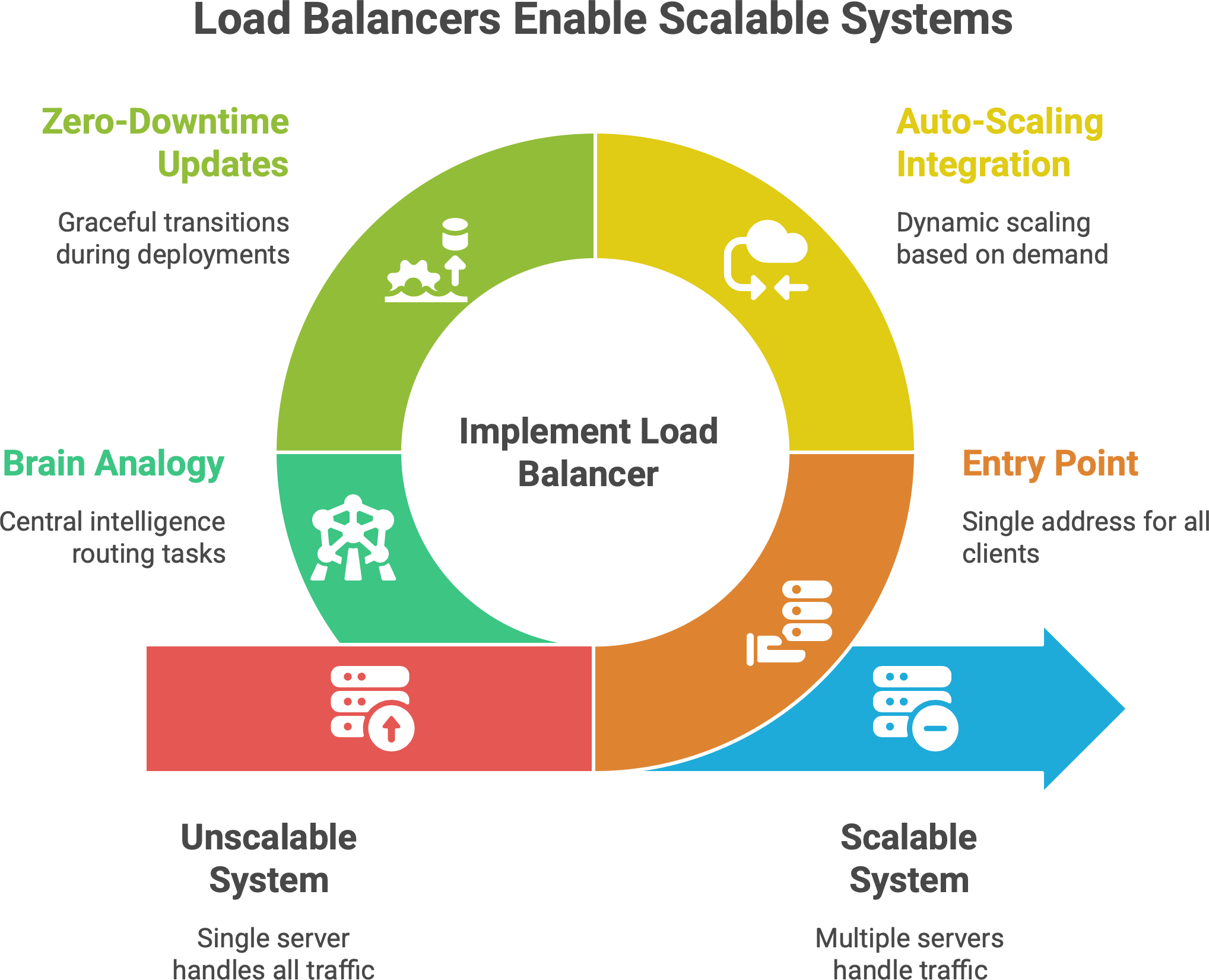
Similarly, on cloud VMs: without a load balancer, you might scale out by putting a new VM behind a DNS entry manually or something - a very clunky process. With a load balancer, it’s often plug-and-play: new server comes, registers, boom, it’s serving live traffic in seconds. This also aids fault tolerance - if one instance in an auto-scaled group dies unexpectedly, auto-scaling replaces it and the LB switches traffic over (plus the LB would have detected it as unhealthy and stopped sending to it within seconds or whatever health check interval).
A key term here is elasticity. Load balancers enable elasticity by serving as the abstraction layer between clients and servers. They are constantly monitoring (via health checks) and adjusting who gets traffic. Some advanced setups even let load balancers trigger scaling - e.g., if queues are building up, the LB might signal to add capacity.
In sum, scaling out = add more workers; load balancer = assign tasks to all workers. Can’t have one part without the other, if your goal is handling more load than a single machine can manage.
Finally, think about the user experience: if 100x traffic comes in (say your product goes viral), auto-scaling might bring up dozens of new instances. The users still go to one URL. Behind that URL, your load balancer fans it out to maybe 50 instances now. The alternative (without LB) would require some DNS trickery or manual traffic splitting by issuing different URLs - not practical. So load balancers are the enablers of smooth scaling.
⚠️ Pitfalls and trade-offs
Load balancing isn’t magic - it introduces its own considerations and potential downsides. It’s important to be aware of these pitfalls.
Single Point of Failure (SPOF). Ironically, the load balancer itself can become a new single point of failure. If you have one load balancer and it crashes, nobody can reach your service (even if your back-end servers are all fine). It’d be like having one waiter in the restaurant - if that waiter steps out, no orders get to any chef. Mitigation: Always have redundancy for your load balancer. This could mean running two instances in an active-passive setup (with a heartbeat and failover IP), or an active-active cluster with both sharing traffic (and clients can fail over to the surviving one). Cloud load balancers are usually designed to be redundant across zones by the provider. For on-prem, techniques like keepalived with VRRP can give two load balancer VMs a virtual IP for failover. In essence, treat your LB layer with the same high-availability approach as any critical component. Also, use health checks on the client side or DNS to detect if an LB is down and route to a backup. For example, some DNS setups will switch to an alternate IP if the primary doesn’t respond.
Added Latency. Each layer of load balancing can introduce a bit of delay. For L4 it’s minimal (just another network hop). For L7, there’s the overhead of terminating TCP/SSL and processing HTTP. If you cascade load balancers (like a CDN to an L7 proxy to a service mesh sidecar), you’ve added multiple hops of processing. This latency amplification can be small individually, but it stacks up. As noted, Layer 7 gives you more control but adds latency and complexity. If misconfigured, a load balancer could also become a choke point (e.g., if it doesn’t have enough resources, it might queue requests). Mitigation: Keep the load balancer layer as slim as needed for the job. Use keep-alive connections to reduce overhead where possible. Monitor the latency your LB adds (many provide metrics for response time). In practice, a well-tuned LB adds only a few milliseconds, but it’s still overhead. Another angle: if your load balancer is geographically far from some clients, that can add latency - sometimes a DNS/global LB solution can direct users to a nearer entry point.
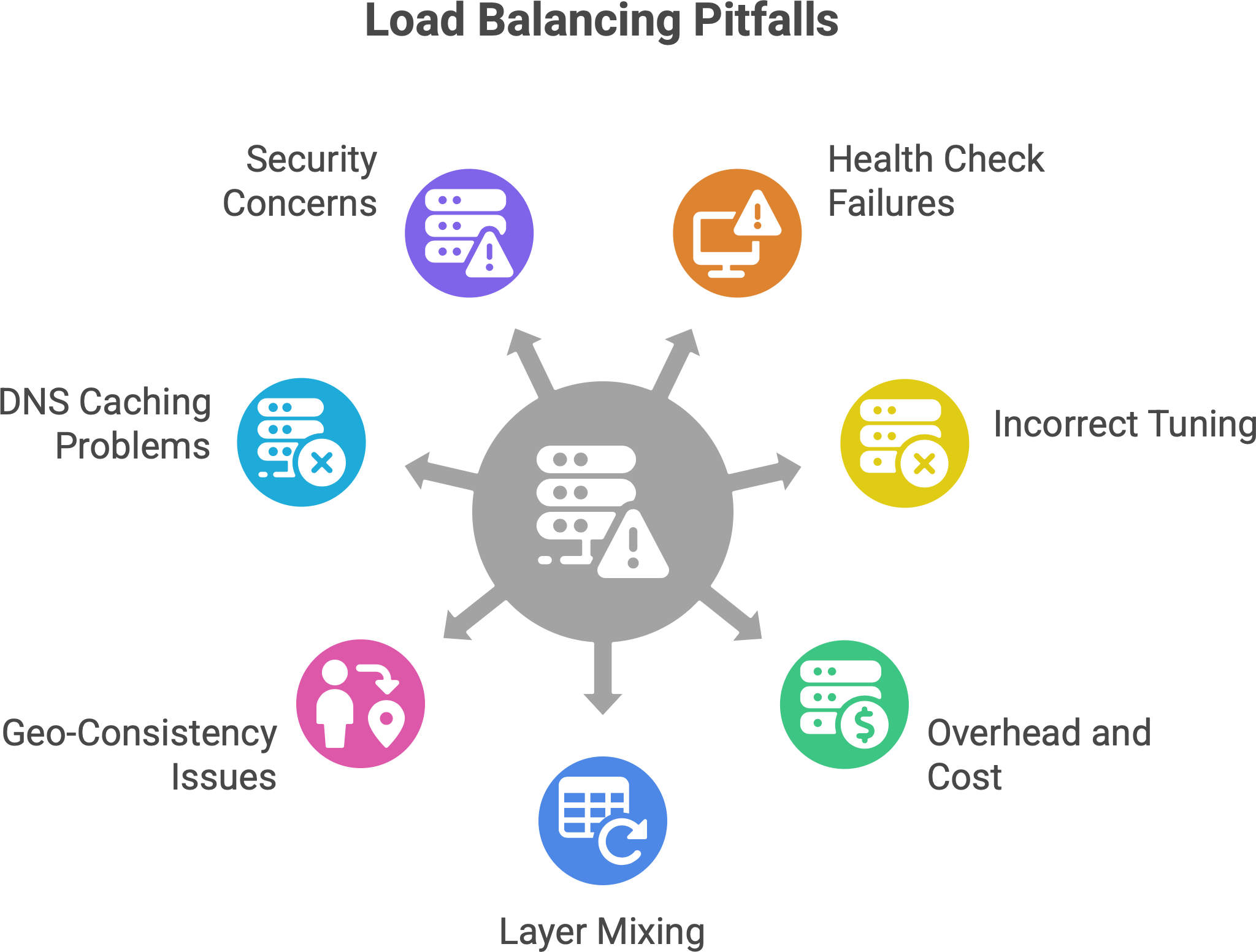
Complexity and bugs. A load balancer is yet another moving piece. Misconfigurations can lead to subtle issues. For instance, choosing the wrong algorithm for your traffic pattern might cause uneven load (e.g., naive round robin when you have very long-lived connections could overload one server). Or enabling sticky sessions without realizing it (some have it default on) could undermine your scaling. Also, if you have multiple layers of LB, debugging can be hard (“Is the user hitting the CDN or not? Did the mesh route this or was it the gateway?”). Modern LBs have lots of features (path rewriting, header insertion, etc.) - powerful but with power comes the possibility of mistakes.
Health Check Pitfalls. Health checks are how load balancers know if a server is alive and well. A common pitfall is misconfigured health checks. For example, a health check that only pings “is port 80 open?” or fetches “/index.html” might be too superficial. A server could be up but suffering (e.g., cannot connect to database, or in a crash-loop for certain features) and a shallow health check returns OK so the LB keeps sending traffic to it. Users hitting that server get errors, but the LB doesn’t kick it out of rotation because the health check didn’t catch the issue. Mitigation: Make health checks as robust as practical. E.g., check a simple but meaningful endpoint (like /health that tests connectivity to dependencies). Also set appropriate timeouts – e.g., mark a server unhealthy if it doesn’t respond within, say, 2 seconds multiple times, to catch hangs. We saw earlier an example: a server was out of memory and not actually processing, but still returned a basic “200 OK” to the LB’s trivial check, so the LB kept sending users there, essentially into a black hole. The fix was to implement deeper health checks (and alerts) to detect such failures. Another one: if health check intervals or thresholds are wrong, you might either remove servers too aggressively or keep a dead server around too long. It’s a tuning game: you want the LB to yank a bad node quickly, but also avoid flapping (e.g., a server that fails one check shouldn’t be kicked out if it was a momentary glitch).
Overhead and cost. Running load balancers (especially robust ones) means you need resources for them. If self-hosting, that’s extra CPU/RAM to handle potentially tens of thousands of connections. In cloud, you often pay per hour and data - at scale, that can be significant. It’s often worth it for the benefits, but it’s a cost to account for. Also, if you encrypt traffic end-to-end, an L7 LB must decrypt and possibly re-encrypt traffic - this offloading is helpful to backend servers, but the LB itself must handle the crypto which could be CPU-heavy (though many LBs can use optimized libraries or even hardware for TLS).
Layer mixing and double handling. Sometimes an application accidentally ends up with multiple load balancing decisions on the same request. For instance, DNS might send user to Region A, but that user’s request might have to go to Region B for some data, causing a trombone effect. Or if you have an L7 LB and the application then calls another service via another LB, you have to trace issues across those boundaries. Each hop is a potential failure point (DNS lookup could fail, LB could be misrouting, etc.). Observability is key - ensuring you have logs or tracing at the LB level helps.
Geo-consistency and caching. In some scenarios (like caching), load balancing could reduce effectiveness if not done right. E.g., if each request of a user goes to a different cache node, they might miss out on cached results each time (cache misses). That’s why for caches or CDNs, consistent hashing or stickiness is used to improve cache hit rates by sending a user to the same node. So one must consider such trade-offs: pure load spread vs. locality.
The “It’s always DNS” problem. If you rely on DNS load balancing, you might hit issues with DNS caching or TTL. Also, changes (like removing a bad server’s IP) might not propagate instantly, leading to some users still hitting a down server until their DNS cache expires. People say “DNS is not a real-time load balancer” for this reason. It’s best combined with other methods or with very low TTLs (which itself can increase DNS query load and sometimes be ignored by resolvers).
Security Considerations. A load balancer can also be a focal point for security. If an LB is compromised or misconfigured (say, doesn’t pass along client IPs correctly, or is open to a certain attack), it can affect all traffic. Also, load balancers often terminate SSL – you need to ensure they are as secure as your app servers (patched for vulnerabilities, etc.). On the flip side, they can also help security by absorbing DDoS or hiding your internal topology.
To summarize, load balancing introduces an extra layer, and with any abstraction, you have to handle it carefully. Ensure redundancy to avoid new single points of failure, understand that it’s not set-and-forget (monitor the LB’s health and performance too), and configure things like health checks and algorithms with your app’s behavior in mind. When set up properly, a load balancer greatly increases reliability; if set up poorly, it can “silently kill” as one article put it - e.g., by routing users to a bad instance without you realizing because dashboards “look green”. Awareness of these pitfalls is the first step to avoiding them.
💡 Load Balancing as a philosophy
Load balancing isn’t just an engineering technique - it can be seen as a philosophy of balance that extends beyond computers. Think about it: it’s about distributing pressure intelligently so that no single component breaks, and the overall system stays healthy.
In life and in teams, the same concept applies. A good team leader is like a human load balancer: they notice when one team member is overloaded and others have capacity, and then redistribute tasks to keep the team effective (and prevent burnout). It’s about balance. If you give all the work to one star performer, they’ll burn out (like a server overloaded) while others stay idle (like underutilized servers). Instead, a wise leader spreads tasks according to each person’s current load and strengths—just as a load balancer routes traffic considering each server’s capacity and current usage.
We can even extend the restaurant analogy: a restaurant manager might move chefs or waiters around on a busy night to balance the workload in the kitchen and on the floor. They might notice the dessert station is backed up while the grill station is idle and shift resources accordingly. That’s load balancing in human terms.
The philosophy of load balancing is essentially resilience through distribution. By not putting all eggs in one basket, by not overwhelming one component, we achieve stability. This is seen in many systems: electricity grids balance load across power plants, shipping companies load balance packages across multiple routes, etc. In each case, the goal is to prevent any single point from being the bottleneck or point of failure.
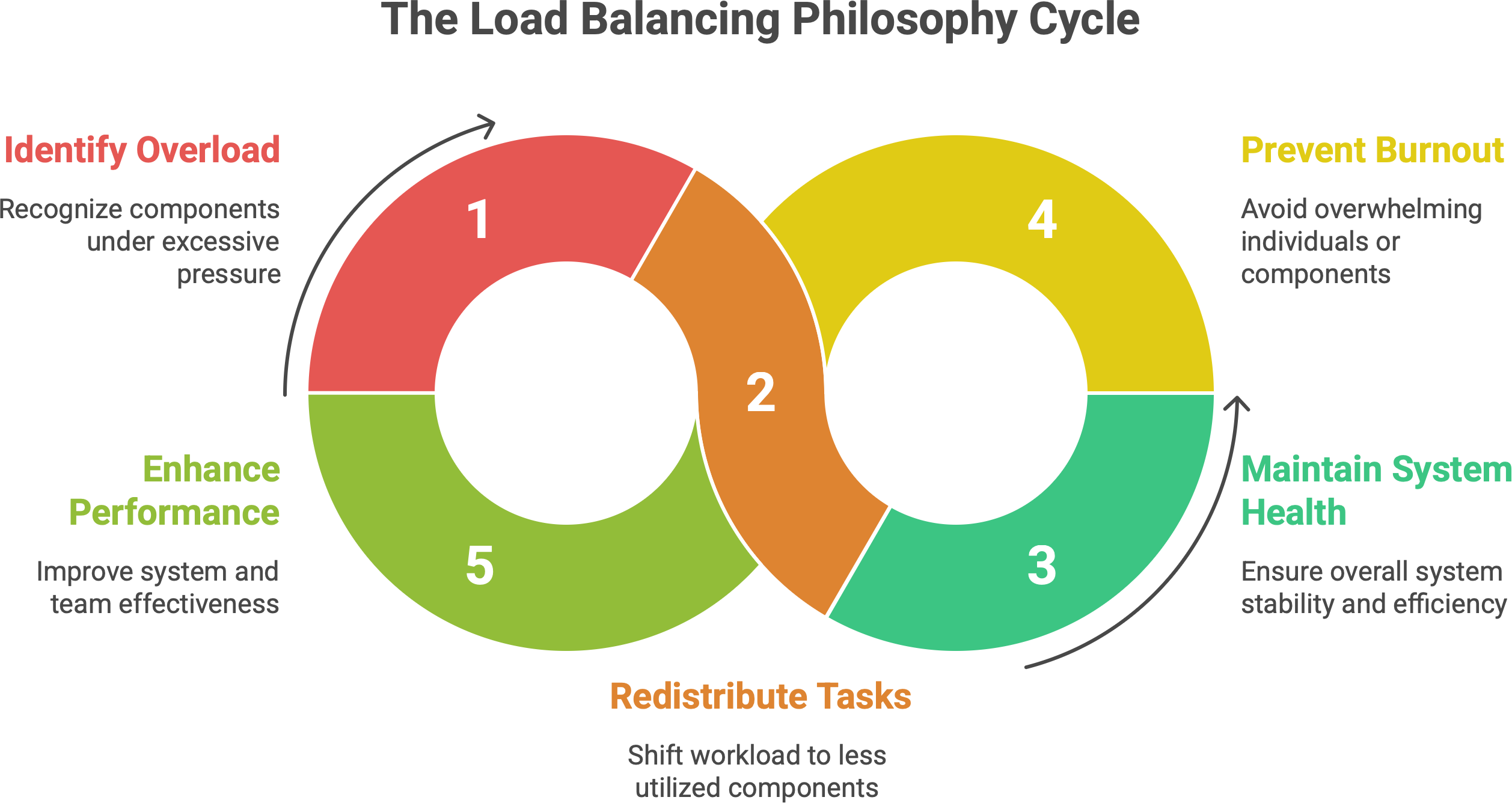
For us tech folks, maybe the poetic way to put it is: load balancers turn chaos into flow, and systems into symphonies. They take the chaos of millions of requests and orchestrate them to where they need to go, preventing cacophony (server overload or crashes). When you watch a well-balanced system under heavy load, it’s quite elegant - everything hums along, users are served, and behind the scenes dozens or thousands of machines dance in unison to handle the load.
In the end, thinking about load balancing reminds us of the importance of balance in design. Too often, systems fail not because they can’t handle something in general, but because one part was overstressed. By balancing, we ensure grace under pressure. It’s a mindset: anticipate where the load will be and distribute it proactively.
So, beyond just the hardware and software, load balancing teaches an almost zen lesson: don’t let any part of the system (or team) carry more than it should - spread out the work, and everything (and everyone) will last longer and perform better.
✍️ Recap
Load balancing means distributing work (requests, connections) across multiple servers. It’s fundamental for building high-performance, reliable, scalable systems. Instead of one server handling everything (risking overload or downtime), you have a fleet of servers sharing the load.
It’s not just about fairness. The goal is resilience and efficiency. A good load balancing strategy ensures no single server becomes a bottleneck (improving throughput and response times) and that the system can tolerate failures (if one server drops, others pick up the slack). It also enables you to grow your service easily by adding more servers (horizontal scaling).
Load balancing happens at multiple layers:
L4 (transport) for low-level, fast routing based on IPs/ports.
L7 (application) for smart routing based on HTTP content, cookies, etc., albeit with slight overhead.
DNS-based for simple global distribution using multiple IPs.
Client-side within apps, where services call other services directly choosing from known instances. Each layer has its use-cases, often used in combination.
Common algorithms include Round Robin (simple rotation), Least Connections (to spread based on current load), hashing (for stickiness), weighted schemes, and more adaptive methods that account for server response times and other metrics. The choice of algorithm should match your workload (e.g., if all requests are equal, round-robin is fine; if not, consider least-connections or adaptive).
State and sessions pose challenges in a distributed environment. If users bounce between servers, you must manage session data. Solutions include sticky sessions (simplest, but can undermine balancing), or better, external session stores / stateless tokens so any server can serve any user without issues. Designing stateless services as much as possible makes load balancing most effective.
In the real world, we have both open-source and commercial tools:
Software like Nginx, HAProxy, Traefik, Envoy are deployed by many to do L4/L7 balancing in data centers and clouds (often on standard VMs/containers, replacing the need for big hardware boxes).
Cloud-managed load balancers (AWS ELB/ALB, Google Cloud Load Balancing, etc.) offer turnkey high availability and scalability, integrating with auto-scaling and eliminating a lot of ops overhead.
Service Mesh proxies (Envoy via Istio/Linkerd) bring load balancing into each service instance for microservice architectures, enabling very fine-grained control and reliability techniques.
Historically, specialized hardware appliances were used, but today software-defined load balancers dominate due to flexibility and cost – the industry trend is moving from proprietary hardware to commodity hardware + OSS software solutions.
Auto-scaling synergy. Load balancers work hand-in-hand with scaling mechanisms. As you add instances or pods, the load balancer updates its pool and starts routing traffic to them. This allows your system to handle growth and spikes seamlessly. Without a load balancer, auto-scaling would have no coordinated way to use new instances. With it, you achieve elastic scaling – users just see a stable service, not the scaling events.
Pitfalls. Be mindful of making the load balancer a new single point of failure (always have a fallback or redundancy). Recognize that each extra layer (especially L7) adds some latency and complexity, so use it judiciously. Configure health checks properly - they are your balancer’s eyes to detect bad servers, so they must actually detect real failures (deep health checks > shallow ones). And monitor your load balancer like any critical component; misconfigurations there can impact the whole system (e.g., all traffic could be misrouted or throttled).
Load balancing is about turning a collection of servers into a single reliable service. It’s the reason we can build sites that serve millions of users - not on one supercomputer, but on thousands of ordinary servers working in unison. It takes what would be chaos (random, spiky traffic) and turns it into an organized flow. In doing so, it also gives us flexibility: we can maintain, deploy, and scale parts of the system without users noticing interruptions.
Know someone who’s just getting into backend development or cloud architecture
If this post helped you, pass it along - help them level up too. 👇
In summary, load balancing is a foundational concept that goes beyond just splitting traffic 50/50 or 33/33/33. It’s about smart distribution of workload, with awareness of performance and reliability. When done right, it makes systems behave elegantly under load - like a well-run kitchen or a well-conducted orchestra, where no single part is overwhelmed and the output (be it dishes, music, or web pages) keeps coming smoothly. By understanding how load balancing works and its caveats, you’re better equipped to design systems that are both strong and flexible, capable of handling the rush hour of the internet without breaking a sweat.